(Posted on the LiquidPlanner blog on 3/24/11)
I walked into my favorite hardware store last week to pick up something fairly small and obscure. It's one of those typical Mom & Pop stores, with every available inch of the walls covered with stuff. Everything from power tools to lint traps...you name it and they have it (in a very small space of course). I was looking for those little plastic things that are used to hold down a power cord, you know the type, right? Of course I didn't know what they were called then but all I had to do was describe it and the store owner knew exactly what it was and where to find it.
Can you imagine how long it would have taken to find the these "cord staples" had the store owner not been there to help? I mean, this is not your average store, with neatly lined shelves and items stacked perfectly. It's more like an organized chaos, and without the help of the workers there, you'd be lost.
Similarly, when working with your project team....
Read more on the LiquidPlanner blog >
Sunday, March 27, 2011


Saturday, December 4, 2010
What Project Managers Can Learn from Angry Birds
If you haven't already discovered the most clever and addictive mobile game, Angry Birds, I suggest checking it out. The movie really tells the story best, but if you don't have the time to watch it, it's about launching birds at pigs. It's not only a physics-lovers dream; there are also some valuable project management lessons to be learned from the game.
Read more on the LiquidPlanner blog...
Read more on the LiquidPlanner blog...
Tuesday, November 9, 2010
Project Schedule Promises: Are We There Yet?
“Just a minute!”
“OK! In a sec...”
“We’ll be done in a bit!”
How many times have you heard yourself say one of those phrases? How many times have they been said to you? If you’re a parent, then you probably find yourself saying them least a few times a day. And you probably learned them from your parents.
The real question is though, how many times were you accurate with that statement? Did you always get to that next task ‘in a sec’, or even in ‘just a minute’? Probably not all of the time. I know I didn’t and I know my kids got frustrated (at least when they were old enough to figure it out).
Now, what if your client or upper management are like your children? You might not say exactly those words, but you might say something like:
“This phase will be finished in a week,” or “Testing will be complete by tomorrow.”
...read more, on the LiquidPlanner blog
“OK! In a sec...”
“We’ll be done in a bit!”
How many times have you heard yourself say one of those phrases? How many times have they been said to you? If you’re a parent, then you probably find yourself saying them least a few times a day. And you probably learned them from your parents.
The real question is though, how many times were you accurate with that statement? Did you always get to that next task ‘in a sec’, or even in ‘just a minute’? Probably not all of the time. I know I didn’t and I know my kids got frustrated (at least when they were old enough to figure it out).
Now, what if your client or upper management are like your children? You might not say exactly those words, but you might say something like:
“This phase will be finished in a week,” or “Testing will be complete by tomorrow.”
...read more, on the LiquidPlanner blog
Thursday, October 14, 2010
Been quiet around here, cause I've been blogging over at LiquidPlanner...
My latest posts on the LiquidPlanner blog -
In Project Estimation, "Guess" is a 4-Letter Word
What's Your Distraction Factor?
Check them out if you'd like!Tuesday, July 20, 2010
LiquidPlanner vs. Wrike, the Battle of the Online Project Management Tool Continues
Next in my little battle for the title of the best project management tool, I took a look at Wrike and compared it to LiquidPlanner. If you’ve read any of my posts before you know that the battle is a little uneven, I am clearly biased towards LiquidPlanner but I do try to take a fair look at each tool. I also like to keep this as a friendly forum for discussion, so if anyone out there from Wrike wants to pop in a comment here and clarify anything about my descriptions, feel free.
I will be comparing the following features:
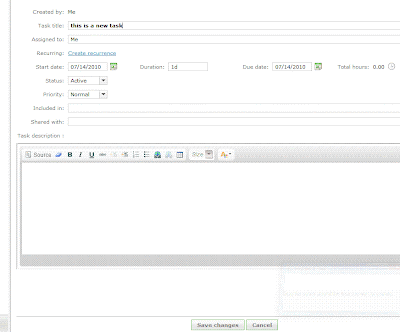
Creating new tasks is pretty quick and simple with Wrike, I specify a title, assignee, start and due date, duration, status, priority, included in, shared with, and description with a rich text edit box. I am allowed to set a recurrence on the task, which is kind-of handy. The duration is a single-point estimate of course. I have yet to find a project management tool that will allow me to have a ranged estimate for a task like LiquidPlanner does. This builds in a level of uncertainty into the schedule which is critical to keep projections realistic, and will keep the project manager from continually going back to revise the schedule when estimates change.
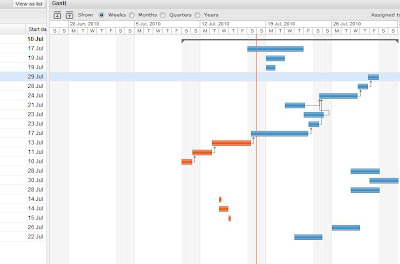
The “priority” field has 3 options - Normal, High and Low. This is a handy feature to be able to flag the task, but it does not make it go any higher in the list of tasks. A personal task list is ordered by due date, which makes sense at a basic level. If tasks need to be re-prioritized then the due dates need to be edited for each task individually, or the end dates adjusted via the timeline. I had fun dragging the little blocks around the timeline but the problem here is that the timeline is only as realistic as I set it to be. The timeline does not take into account the durations of tasks, the resources assigned to them and the other workload or work schedule of those resources, office holidays, etc. There is no way to see if any of the tasks are at risk of being completed by their due date, until they are actually overdue and then they turn red.
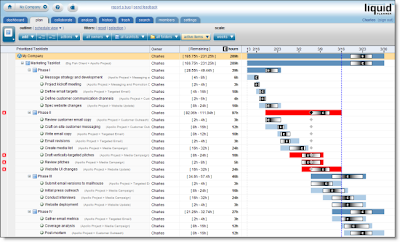
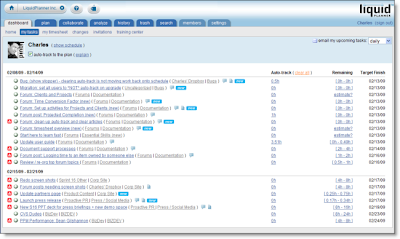
With LiquidPlanner, making a task highest priority is done simply by dragging it to the top of the task list. When this happens, the expected completion date for that and all other tasks updates appropriately. The expected completion date takes into account the other tasks assigned to that resource, working schedule of the resource, delay until date, and any other outside dependencies. The date calculated and schedule created shows a much more realistic picture of when things will get done, not just when we hope they will get done. Any items that are risk of not being completed by their promise date will immediately turn red and will remain that way until priorities are shifted or dates revised.
Wrike has a feature called “Flexible Structures”, which allows the manager to build hierarchies of tasks and simultaneously put a sub-project and a task in many projects. Tasks can be sorted in many ways. LiquidPlanner also allows the manager to organize tasks into a folder view and a task list view. So, projects are built and organized in the “Organize” view and then priorities are set and adjusted in the “Task” view.
Collaboration
Wrike has a “Discussions” tab for each task, and a tab where files can be uploaded. LiquidPlanner has additional levels of collaboration for each task, project folder, and root of the project. LiquidPlanner includes:
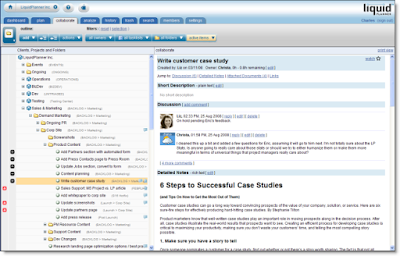
This keeps the collaboration rich & organized. Wrike is launching an “Activity Stream” feature with it’s new version, which will show all activity over all projects and also include comments or discussion. This is a nice way to watch everything but I didn’t see a way to sort this stream by project/user/etc.
LiquidPlanner has a client portal system, a great way to collaborate with clients while controlling exactly what they can view & edit. Wrike does allow clients to be invited to the workspace to view projects, but as far as I can tell there is no portal-type system setup with controls over what elements can be viewed, edited, etc.
Reporting
Wrike has a nice sized list of filters available, all prebuilt and accessible from the left column. This is handy, but what I personally find more practical and useful is the prebuilt (and very slick) reports and custom filters that can be setup with LiquidPlanner. LiquidPlanner includes the ability to sort by task owner, project folder, task list and status (active, complete, flagged, work remaining, etc).
LiquidPlanner has a free iphone app, Wrike reports to be working on their app.
Both systems include timesheets.
Summary
Although I found the Wrike interface clean and fairly easy to use, LiquidPlanner still has more of the features that are important to me in the type of project management work that I do, with constantly shifting priorities and tasks that need to need ranged estimates. And with all the talk of project collaboration tools, LiquidPlanner is pretty packed with great (and very organized) ways to collaborate.
What do you think?
- Task Management / Schedule Building
- Collaboration
- Reporting
- Mobile & Misc
Creating new tasks is pretty quick and simple with Wrike, I specify a title, assignee, start and due date, duration, status, priority, included in, shared with, and description with a rich text edit box. I am allowed to set a recurrence on the task, which is kind-of handy. The duration is a single-point estimate of course. I have yet to find a project management tool that will allow me to have a ranged estimate for a task like LiquidPlanner does. This builds in a level of uncertainty into the schedule which is critical to keep projections realistic, and will keep the project manager from continually going back to revise the schedule when estimates change.
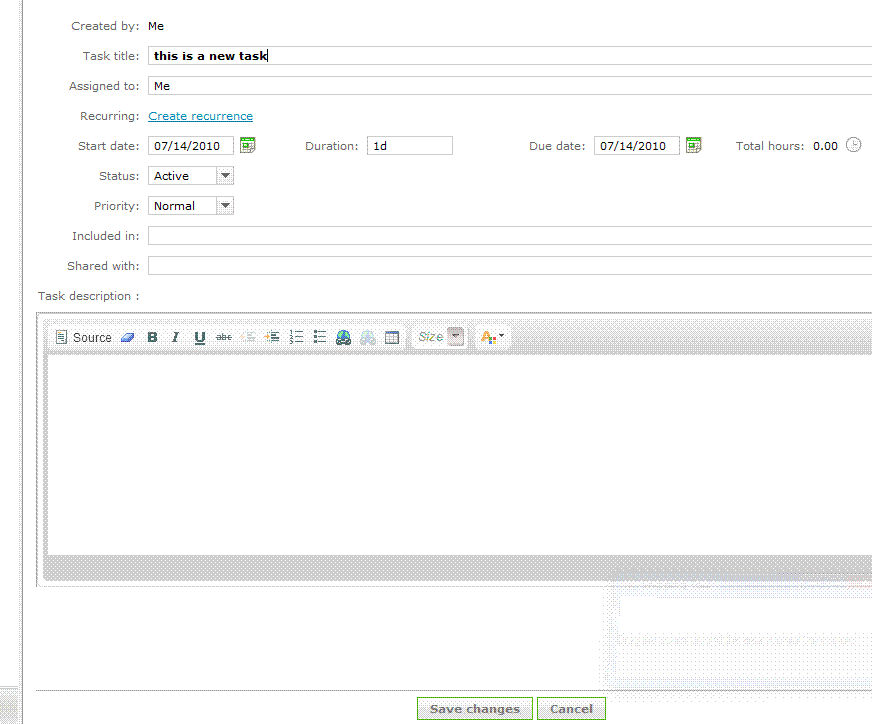
The “priority” field has 3 options - Normal, High and Low. This is a handy feature to be able to flag the task, but it does not make it go any higher in the list of tasks. A personal task list is ordered by due date, which makes sense at a basic level. If tasks need to be re-prioritized then the due dates need to be edited for each task individually, or the end dates adjusted via the timeline. I had fun dragging the little blocks around the timeline but the problem here is that the timeline is only as realistic as I set it to be. The timeline does not take into account the durations of tasks, the resources assigned to them and the other workload or work schedule of those resources, office holidays, etc. There is no way to see if any of the tasks are at risk of being completed by their due date, until they are actually overdue and then they turn red.

With LiquidPlanner, making a task highest priority is done simply by dragging it to the top of the task list. When this happens, the expected completion date for that and all other tasks updates appropriately. The expected completion date takes into account the other tasks assigned to that resource, working schedule of the resource, delay until date, and any other outside dependencies. The date calculated and schedule created shows a much more realistic picture of when things will get done, not just when we hope they will get done. Any items that are risk of not being completed by their promise date will immediately turn red and will remain that way until priorities are shifted or dates revised.

Wrike has a feature called “Flexible Structures”, which allows the manager to build hierarchies of tasks and simultaneously put a sub-project and a task in many projects. Tasks can be sorted in many ways. LiquidPlanner also allows the manager to organize tasks into a folder view and a task list view. So, projects are built and organized in the “Organize” view and then priorities are set and adjusted in the “Task” view.
Collaboration
Wrike has a “Discussions” tab for each task, and a tab where files can be uploaded. LiquidPlanner has additional levels of collaboration for each task, project folder, and root of the project. LiquidPlanner includes:
- Description (plain text edit)
- Discussion (Twitter type comment stream)
- Detailed Notes (rich text edit)
- Links
- Attached documents

This keeps the collaboration rich & organized. Wrike is launching an “Activity Stream” feature with it’s new version, which will show all activity over all projects and also include comments or discussion. This is a nice way to watch everything but I didn’t see a way to sort this stream by project/user/etc.
LiquidPlanner has a client portal system, a great way to collaborate with clients while controlling exactly what they can view & edit. Wrike does allow clients to be invited to the workspace to view projects, but as far as I can tell there is no portal-type system setup with controls over what elements can be viewed, edited, etc.

Reporting
Wrike has a nice sized list of filters available, all prebuilt and accessible from the left column. This is handy, but what I personally find more practical and useful is the prebuilt (and very slick) reports and custom filters that can be setup with LiquidPlanner. LiquidPlanner includes the ability to sort by task owner, project folder, task list and status (active, complete, flagged, work remaining, etc).
LiquidPlanner has a free iphone app, Wrike reports to be working on their app.
Both systems include timesheets.
Summary
Although I found the Wrike interface clean and fairly easy to use, LiquidPlanner still has more of the features that are important to me in the type of project management work that I do, with constantly shifting priorities and tasks that need to need ranged estimates. And with all the talk of project collaboration tools, LiquidPlanner is pretty packed with great (and very organized) ways to collaborate.
What do you think?
Thursday, June 24, 2010
Email vs. Stream for Ideal Project Communication

I spotted this interesting post by Dennis Stevenson titled "Why would you abandon e-mail for Streaming tools?", which was a reaction to an article by Stowe Boyd "The Business Case For Streams versus Email". Both are worth a read, and got me thinking about how we communicate and how our messages are received (or not received) by our team. The debate here is stream (public post on shared workspace, ie. twitter/yammer like communication) vs email.
It's funny because like what Stowe Boyd mentions in his piece, this is just the next debate over company communications. In the 70's and 80's there was the debate about email, and in the 90's web-based email. I'm sure there was once a big debate about how and when to best use the fax machine, and then it was the greatest thing ever, and these days I just wish I could burn the thing.
Dennis Stevenson compares email to a hammer:
"pounding everything as if it were a nail. It's a useful tool, but not suited to every situation. Flow or Streams are a different tool, say a pair of pliers. If you've never used a pair of pliers and always used a hammer, you may not have a particularly good understanding of all the things you can do with pliers. This may call for experimentation and some trial/error. That's ok."
I would think that those who prefer to stick to email would say that when you send an email you'll be assured that the recipient will see it and read it. You can select exactly who will receive it. This might not be the case when posting something to the stream.
But that's not necessarily true. That message might never get to where it needs to be because:
- The email could get blocked or stalled by the occasional full mailbox, spam rule, down server
- The recipient could have email rules setup to file away specific messages into folders, this sounds great and very organized but if the filing is happening before the email is being read than it's possible that email might get missed
- The recipient might accidentally delete the message while batch deleting the junk mail from the night before (hasn't everyone had one of those "Who just sent me an email? I just deleted by accident!" experiences, where you send a note out to everyone you can think of asking who just sent you an email?). This is less of a problem these days now that mail can more easily be retrieved from the trash, but it could still happen.
- The recipient might just choose not to read the email from you (in this case there are some other 'personnel' problems that should probably be tackled first).
So for any of these reasons the message is lost, deleted forever or buried in a pile of other messages, never to be read. When it’s something important it’s always good to follow up via some other form of communication (phone, instant message, tap on the shoulder, dart-gun, etc.) but it’s better when the message gets to where it needs to go in the first place. Even when it does get there, it’s not always ideal to have it sitting in one person’s inbox, more on this below.
When a message is posted to the ‘stream’ (via Twitter hashtag, Yammer, or Yammer-style communication tool embedded within the LiquidPlanner online project management system) there are ways to direct the message to a specific person or group of people, and it’s also just out there open for the public. Is the message sitting in someone’s inbox? Well, it can be if there are email alerts setup for messages and in some cases those hesitant to change can even use their email to participate in the discussion on the stream. Unless it’s strictly confidential information (and in this case even email might not be the best option) I think having the message on a shared system, in the stream, is much better solution long term. What it really takes is a cultural shift, having a team that treats the stream like they used to (hopefully) treat their email - keeping the application or browser window open, referring to the stream first when they are looking for something (rather than checking email, wiki, or other notes). Posting information on a shared system means that information will never get lost with one person, or in one person’s email folders. This will help with remote teams, or if someone is unavailable or leaves the organization. Posting to the stream means that critical details are always publicly accessible if an ass needs to be covered at some later point in the project. Although there is a problem that with some tools the messages might not be retrievable after a certain period of time (mentioned in the 2nd comment on the Boyd post). Because of this Twitter might not be the best tool for project communications.
One of the features I like best about the LiquidPlanner online project management tool is that the chatter can be easily organized by project task, sub-folder, or on the root of the project or client. There is no issue of older comments being deleted and the details specific to a task will always be stored where it can be easily found, with that task.
Communication is a critical element of project success, and as the team grows the number of possible communication channels multiplies ( N x ( N-1 ) / 2, where N is the number of stakeholders). I believe that using the stream is the easiest and most efficient way to cover all of those communication channels and ensure that the important details are available anytime and for anyone.
Saturday, May 15, 2010
It's All About the Plan, Right?
This brings back somewhat painful memories of a large project post-mortem where the CEO continually asked "Well, was there a project plan?" (and didn't ask anything else). In this specific case, there was a decent project plan, but so many other things (that the CEO chose not to acknowledge) went wrong that the project plan was not able to salvage the project.
Jim Vaughan, in the IT Project Management Blog, also asks (from a much more informed perspective of course) why so many projects with a project plan are failing? His explanation is that too many project managers will open up their slick & sophisticated PM tools and start entering tasks, since the task list is the first thing they will see. This process is a more bottom-up approach (or inside-out, as he says).
His solution to this problem:
...is not the tool but rather the methodology that the PM chooses to use for the development the project plan. The best way that I have found to do this is to gather the technical experts together in a large room with a blank wall. Together, under the leadership of the project manager, using sticky notes, create the WBS from the top down on the blank wall. From there the data can be entered into the tool of choice. This methodology will produce a much more effective plan.
Agreed, that working together with the experts will lead to much more accurate and reliable project plan, but let's not discount the advantage that a powerful project management and collaboration system can give the project leader in setting up and maintaining the plan throughout the project. With web based project management software where all team members can log in and collaborate on each task in the project, the project plan will no longer be something that one person maintains in their own little bubble (like I used to, back in my MS Project days). With a system that allows team members to estimate their tasks in ranges and add new tasks once issues crop up or new challenges arise, the project plan will continuously be relevant.
 So, take Jim Vaughan's good advice in building your next project plan, but make sure when you do that you are using a project management tool (albeit somewhat slick) that will allow you to keep your experts engaged and connected throughout the project.
Jim Vaughan, in the IT Project Management Blog, also asks (from a much more informed perspective of course) why so many projects with a project plan are failing? His explanation is that too many project managers will open up their slick & sophisticated PM tools and start entering tasks, since the task list is the first thing they will see. This process is a more bottom-up approach (or inside-out, as he says).
His solution to this problem:
...is not the tool but rather the methodology that the PM chooses to use for the development the project plan. The best way that I have found to do this is to gather the technical experts together in a large room with a blank wall. Together, under the leadership of the project manager, using sticky notes, create the WBS from the top down on the blank wall. From there the data can be entered into the tool of choice. This methodology will produce a much more effective plan.
Agreed, that working together with the experts will lead to much more accurate and reliable project plan, but let's not discount the advantage that a powerful project management and collaboration system can give the project leader in setting up and maintaining the plan throughout the project. With web based project management software where all team members can log in and collaborate on each task in the project, the project plan will no longer be something that one person maintains in their own little bubble (like I used to, back in my MS Project days). With a system that allows team members to estimate their tasks in ranges and add new tasks once issues crop up or new challenges arise, the project plan will continuously be relevant.
So, take Jim Vaughan's good advice in building your next project plan, but make sure when you do that you are using a project management tool (albeit somewhat slick) that will allow you to keep your experts engaged and connected throughout the project.
Subscribe to:
Posts (Atom)